Tampilkan postingan dengan label free software. Tampilkan semua postingan

26 Jan 2011

Tips Merubah file Office menjadi PDF

Microsoft menyediakan add-on gratis yang memungkinkan kalian untuk merubah/mengkonversi file Microsoft File menjadi file .PDF. Saya yakin ketika kalian menyiapkan tesis atau presentasi, akan jauh lebih baik untuk menyimpannya dalam format .PDF karena mudah dibaca dan mudah digunakan.
Download Plug-in dari link yang saya berikan dan menginstalnya
Di bawah pilihan menu Save, kalian akan melihat pilihan yang mengatakan save as file .pdf atau save and send (create pdf/xps document) di office 2010,Gunakan sub menu tersebut untuk menyimpan Microsoft excel, word, akses dan file dll ke dalam format .Pdf.
Saya sudah menguji plugin ini untuk Microsoft 2007 atau 2010 dan 100% bekerja dengan baik pada:
Microsoft Access 2007/2010
Microsoft Excel 2007/2010
Microsoft PowerPoint 2007/2010
Microsoft OneNote 2007/2010
Microsoft word 2007/2010
Microsoft Publisher 2007/2010
Microsoft Visio 2007/2010
Microsoft InfoPath 2007/2010
13 Jan 2011

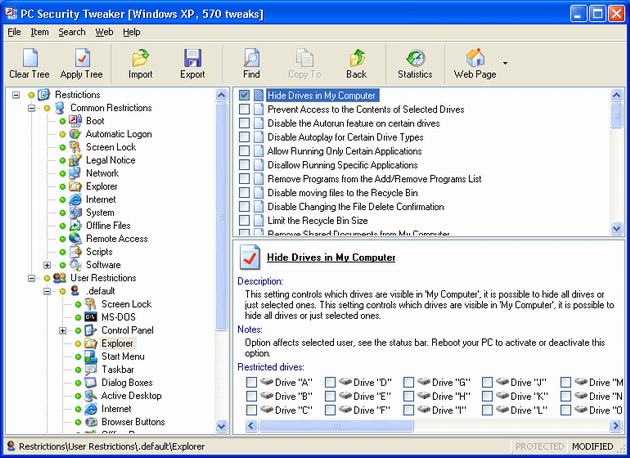
PC Security Tweaker 9.6


PC Security Tweaker is a security tweaking utility you can use to tweak Windows-based computers. It is compatible with all Windows versions and lets you control which users are allowed to access your PC and the level of access each user may have.

•You can choose to tweak access to lots of Control Panel applet functions, including Display, Network, Passwords, Printers, System, Add/Remove Programs, etc.

•You can password-protect Windows and restrict users to running specific applications only. Security tweaks can be applied universally or just to specific users. This software also lets you tweak Internet Explorer to secure web browsing.

•You can enforce users to use separate system profile folders and provide them with their own custom shell folders such as Desktop, Start Menu, Favorites, My Documents. Additionally, by tweaking, you can: disable selected Start Menu items, lock and protect disk drives in My Computer, disable the DOS and command prompt, interruption boot keys, real DOS mode, Registry editing, taskbar, task manager, and network access, hide desktop icons, and much more.


Serial number
34219AB0563EF4
312195B05C3842
382196905F3104
39219FD05035A1
302196C05A3D5F
3E219D305937BF
34219320593FE6
37219DC05A32AB
3D219E405331BA
342196705D3CCA

9 Jan 2011

Audio Edit Magic 7.6.0.58

Audio Edit Magic 7.6.0.58 | 10.31 Mb

Audio Edit Magic is a full-featured digital audio editing software that offers a variety of audio recording, mixing, editing, analyzing and effects processing possibilities. It provides an intuitive, easy-to-use interface and is designed for the everyday user. It has dozens of amazing audio effects and tools for converting audio files into different formats, including MP3, WMA, WAV, Ogg Vorbis and many others. And that's just the beginning of what you can do with Audio Edit Magic. If you're using audio for anything - websites, PowerPoint presentations, Flash animations, Audio Edit Magic will take your creations to the next level.

CorelDRAW Graphics Suite X5 ver.15.2.0.661

CorelDRAW Graphics Suite X5 ver.15.2.0.661 - SP2 (2011/RUS/ENG) | 680MB
Genre: Graphics & Design

CorelDRAW® Premium Suite X5 is here to expand your design and communication possibilities! In addition to the new and enhanced illustration, page layout, photo editing and tracing of CorelDRAW® Graphics Suite X5, this premium design collection includes interactive flash animation, website and video creation—giving you hundreds of dollars in savings, compared to buying the applications separately. With the new audio/visual components, you can engage eyes and ears with greater impact than ever before!

* Design more efficiently with the new and enhanced features of CorelDRAW® Graphics Suite X5
* Build standout websites with the help of dozens of templates and SiteStyles®
* Edit video and quickly create high-definition movies with 30 creative templates
* Create interactive flash animations and stunning flash movies with over 350 built-in multimedia effects
* Keep your files secure with WinZip® 14.5 Pro (included), the world's #1 file compression, encryption and backup software

The package provides a complete set of tools for creating illustrations, logos, brochures, newsletters, advertisements, booklets and publicity boards and is the best graphics solution. This software package is perfect for creating new trends in the fashion industry and the development of designer clothing. Create intricate designs and distribute them to the image field will help you a powerful arsenal of tools. CorelDRAW and Corel PHOTO-PAINT significantly expanded its capabilities over previous versions, and analogs of the software industry.

Members package

CorelDRAW X5 - Intuitive software for creating vector graphics and page layout.
Corel PHOTO-PAINT X5 - Professional image editing application designed specifically to work with a graphic document.
Corel PowerTRACE X5 - Tool convert bitmap images into vector.
Corel CAPTURE X5 - Utility to create instant snapshots.
Corel CONNECT - Full-screen browser that allows you to search for digital content stored on your computer or local network, from the software package.

System requirements:

* Microsoft® Windows® 7, Windows Vista®, Windows® XP, with latest service packs installed (32-bit or 64-bit editions)
* Intel® Pentium® 4, AMD Athlon™ 64 or AMD Opteron™ (Intel® Core™ Duo 1.83 GHz, AMD Dual-Core 2.0 GHz or higher required for video editing)
* 1 GB RAM (2 GB or higher recommended)
* 128 MB VGA VRAM or higher (256 MB or higher recommended)
* 4.5 GB hard disk space (to install all applications). Up to 9GB needed to install extra content
* 32-bit ODBC drivers for external database connectivity (for website creation)
* Mouse or tablet
* Windows-compatible sound card
* 1024 x 768 screen resolution (768 x 1024 on a Tablet PC)
* DVD drive
* Recordable DVD required for creating DVDs
* Recordable Blu-ray™ drive required for creating Blu-ray™ discs
* Internet connection required for online features and product registration
* Microsoft® Internet Explorer® 7 or higher

Title: CorelDRAW Graphics Suite X5
Software version: 15.2.0.661 SP2
Developer: Corel Corporation
Language: English / Russian
Tablet: Is present
Size: 680 MB

DOWNLOAD

Protect Folder 3.2.1


Folder Protect is a new concept in Data Security. It lets you password protect and set different access rights to your files, folders, drives, installed programs and popular extensions. Folder Protect goes beyond normal file locking and encryption by letting you customize your security and choose between making files inaccessible, hidden, delete-proof or write-protected

8 Jan 2011

Ultra Video Converter 5.1.0103 Multilingual


Ultra Video Converter 5.1.0103 Multilingual | 8.92 MB


Ultra Video Converter is a powerful video tool to convert all popular video formats to AVI, MPEG, VCD, DVD, WMV, ASF, MP4, 3GP formats. It can support almost all video formats including AVI, DivX, XviD, MPEG, DAT, WMV, ASF, RM, RMVB, MOV, QT, MP4, M4V, 3GP, FLV, MKV. Integrated High-speed MPEG encoder which let you make DVD-Video files (VIDEO_TS, AUDIO_TS) and VCD/SVCD image (*.bin, *.cue), so you can burn VCD/SVCD/DVD disc easily by using third-party buring tools.

Ultra Video Converter allows you to split, join and convert video files. Ultra Video Converter lets you join small video files into a large movie file. It also splits large video files into smaller pieces. You can create files that are small enough to email to friends and family. The main features include: adjust output video quality, adjust 4:3 or 16:9 video aspect, add subtitile onto the output video, all encoders/codec are built-in and any supported conversion can be done once you downloading the software.
Fast conversion speeds and high quality, simple GUI and very EASY to use.

Key Features:
• Video source supports AVI, DivX, XviD, MPEG, DAT, WMV, ASF, RM, RMVB, MOV, QT, MP4, M4V, 3GP, FLV, MKV etc.
• Supports all video files to AVI, DivX, Xvid
• Supports all video files to MPEG1, MPEG2
• Supports all video files to VCD, SVCD, DVD compatible MPEG formats
• Supports all video files to VCD SVCD image (*.BIN, *.CUE) and DVD-Video files (*.IFO,*.VOB,*.BUP)
• Supports all video files to WMV, ASF
• Supports all video files to MP4, 3GP
• All encoders/codec are built-in and any supported conversion can be done once you downloading the software
• Batch files conversion
• Output size adjustment, output quality adjustment
• Cut unwanted parts by specifing start time and end time
• NTSC/PAL setting options for DVD, VCD, SVCD exporting
• Support "Drag and Drop" from Windows Explorer
• Custom define the output audio volume.
• Add letterbox to keep the original aspect ratio
• Support large video file, even large then 2GB
• Fast conversion speeds and high quality
• Simple GUI and very EASY to use

24 Des 2009

Tune up utilities 2010


Tune up utilities is a collection of software utilities that is useful to you if you want to maximize the function, work, and the performance of your computer system, now tune up utilities, comes with their latest product, the TuneUp Utilities 2010, anything new from them?

a friend who might still remember when we had here share about tune up utilities 2009, that which has been described many of its usefulness, this software is now updating itself with this 2010 version,
well, what are the new things from this software?

1. no change in appearance, ie at the interface or interface software from the start of this center, looks much simpler and simpler, too attractive than before, also its superiority (in my opinion) from the current interface is, so we easily access the features

2. still under discussion looks insight, if observed, will have one icon that appears in the tray (located at bottom right), whose function is to help us monitor what things are happening and a shortcut if you want to turn on turbo mode, it is felt quite useful, because we can monitor at once turn on certain functions without having to open the main window

3. Turbo mode, what is turbo mode? at the point 2 has been mentioned about turbo mode, but no explanation, at this point that we discussed about the latest and useful features of TuneUp Utilities 2010, the turbo mode will optimize the work of your computer system, with how to disable that feature less useful, so the system can focus on providing resources to programs that you really need it, about how to tune up utilities to determine what (you think) is useful, which is not, TuneUp Utilities provides some of the questions where you can choose according to your needs, so do not be afraid, the program that you think is important to keep the road

DOWNLOAD Tune up utilities 2010